Write it badly. Send it well.
The follow-up, the polite no, the complaint response. Say it in one sentence. The AI email writer lives inside Gmail and Outlook, not in another tab.
A few words from you, and it still sounds like you took your time.
Word2Mail reads your email only to write that one draft, never to train a model.
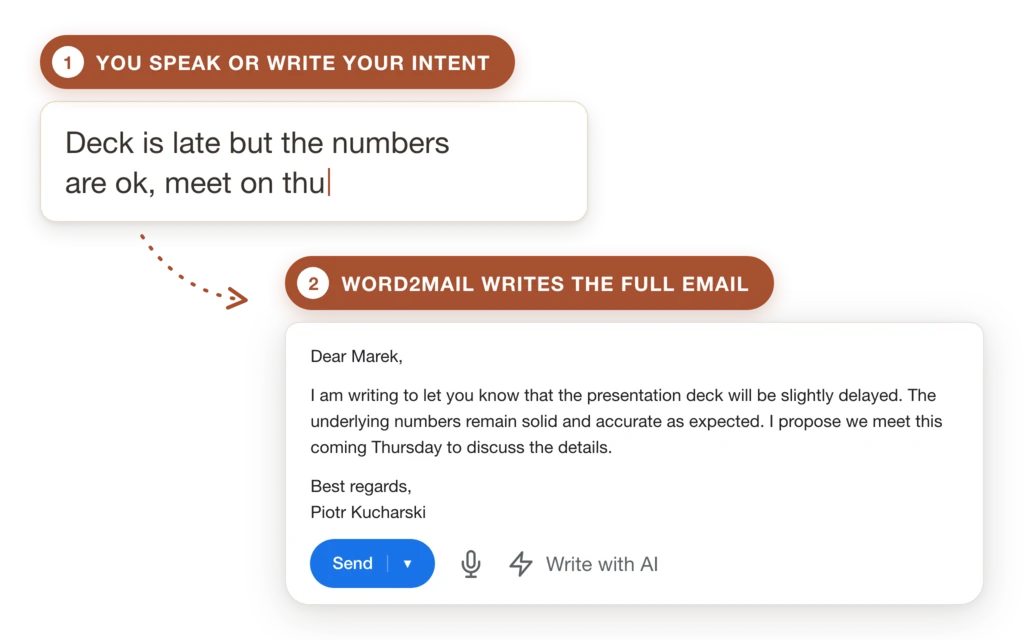
You know what you want to say. Putting it into words is the work.
It's in your head in three seconds
Then it has to become an email. You open the reply window: the extension is already there, no separate app, no second tab.
No copy-pastingThe first sentence takes longest
So you don't write it. Say or type what it's about: no punctuation, no polishing. The AI does the rest.
Speak or typeA finished email comes back
Greeting, body, sign-off (in the tone you asked for). Read it, change it if you want, send it. Nothing goes out without your click.
You have the last wordA finished email, not a raw transcript
We don't transcribe what you say. We build an email out of it: greeting, ordered paragraphs, sign-off. And when you reply, the extension reads the open thread first, so the answer actually answers the question.
Your style. Set once, overridden anytime.
In settings you save what always applies: how you address clients, what your emails never contain. Two thousand characters for your rules. The tone of one email is faster said than clicked: "polite but firm, it was due last Friday." A one-off instruction beats the setting.

In the language the conversation is in
It replies in the language of the thread: no switching anything. And if you want otherwise, just say so: "reply to him in German."

We don't ask for access to your mailbox
The extension reads only the thread open on your screen, and only when you ask for a reply. It has no permission to browse your mail, so there is nothing for us to store. Your email exists to produce that one draft, never to train a model.

Two things you're probably thinking
"Every AI email tool sounds the same"
And usually it does. Because all it gets is the prompt: type "write me an email" and you get an email, just somebody else's. There's one difference and you only see it on a reply: when the tool knows the conversation, it stops writing in general terms. Judge us on the second email, not the first.
"I tried ChatGPT and it took longer"
Open a tab, paste the previous message, write the prompt, paste the answer back, fix the formatting. On a long email that pays off. On a three-sentence reply it doesn't.
Who it's for, and who should wait
Works if
- You write in Gmail or Outlook in a desktop browser. The extension runs in Chrome, Firefox and Edge. Install it once and it shows up in your reply window.
- Most of your email is replies. Reminders, follow-ups, answers to enquiries and complaints: anywhere it matters what came earlier in the conversation.
- Form costs you more time than the decision. You know what you want to say; the problem is putting it into words.
- You write in more than one language. It replies in the language of the thread, and if you want otherwise, just say so.
Wait if
- You write from your phone. Browser extensions run on desktop; there's nothing to install on a phone.
- Your email can't leave your machine. The recording and the text go to our server so the model can write the reply. We don't offer local processing today. If that's a hard requirement where you work, email us. We'll tell you straight what's possible.
- You write documents where every word carries weight. Contracts, terminations, pre-litigation correspondence: there the tool can assist, but not author.
Pricing
Ten emails a month, free. No card.
That'll do for the test.
Plans scale up to 1200 emails monthly
See full pricing →